Contents (17)
Anyone looking into Crocoblock for the first time faces a long list: JetEngine, JetSmartFilters, JetElements, JetMenu, JetBooking and so on. 23 plugins, all starting with "Jet", many with similar-sounding promises. The obvious reaction is to buy the whole bundle straight away and activate everything.
I advise against that. In my projects, rarely more than four or five Jet plugins run at the same time, and that's a good thing. In this overview I explain what each plugin does, which combination suits which project, and when the bundle pays off compared with single licences. There is a separate guide for each plugin, linked in the table.
What is Crocoblock?
Crocoblock is a provider of WordPress plugins that were originally developed for Elementor. Today, some of them also work with the block editor (Gutenberg), with Bricks and with Divi. Together, the plugins are called "JetPlugins".
The focus is on dynamic websites: custom content types, filters, forms, bookings, shops. On top of that come design tools such as additional widgets, mega menus and popups.
Two points that apply according to Crocoblock and matter for your planning: the JetPlugins work with Elementor without you needing Elementor Pro. And there is no free trial, but there is a 30-day money-back guarantee.
As technical requirements, Crocoblock lists PHP 8.1 or higher, MySQL 5.7 or higher, an SSL certificate and a recommended 512 MB of PHP memory. Take that last point seriously. Cheap shared hosting quickly reaches its limits with a larger Jet stack.
All 23 Crocoblock plugins at a glance
| Plugin | What it's for | Guide |
|---|---|---|
| JetEngine | Custom content types, fields, listings and dynamic content | JetEngine |
| JetSmartFilters | AJAX filters for posts, content types and products | JetSmartFilters |
| JetFormBuilder | Dynamic forms | JetFormBuilder |
| JetBooking | Bookings for rentals, holiday apartments, accommodation | JetBooking |
| JetAppointment | Appointment booking, payment via WooCommerce | JetAppointment |
| JetGeo | Preparing content for AI tools, rules for AI crawlers | JetGeo |
| JetWooBuilder | Designing custom WooCommerce shop pages | JetWooBuilder |
| JetProductGallery | Product images and videos as a gallery or slider | JetProductGallery |
| JetProductTables | Product lists as a table | JetProductTables |
| JetCompareWishlist | Compare and wishlist for WooCommerce | JetCompareWishlist |
| JetSearch | Fast AJAX search | JetSearch |
| JetReviews | Reviews, comments, star ratings | JetReviews |
| JetElements | Collection of general-purpose design widgets | JetElements |
| JetTabs | Tabs and accordions | JetTabs |
| JetTricks | Visual effects and animations | JetTricks |
| JetBlog | Designed blog pages and post lists | JetBlog |
| JetBlocks | Extra elements for headers and footers | JetBlocks |
| JetMenu | Mega menus for desktop and mobile | JetMenu |
| JetPopup | Popups with triggers and conditions | JetPopup |
| JetThemeCore | Theme builder for headers, footers and templates | JetThemeCore |
| JetGridBuilder | Flexible grids for posts and categories (free) | JetGridBuilder |
| JetStyleManager | Styling blocks in the block editor (free) | JetStyleManager |
| JetMessenger | Private messaging between logged-in users | JetMessenger |
Not every plugin is available for every builder. Elementor is fully supported; for Gutenberg, Bricks and Divi it is a subset in each case. Exactly which ones is stated on each product page.
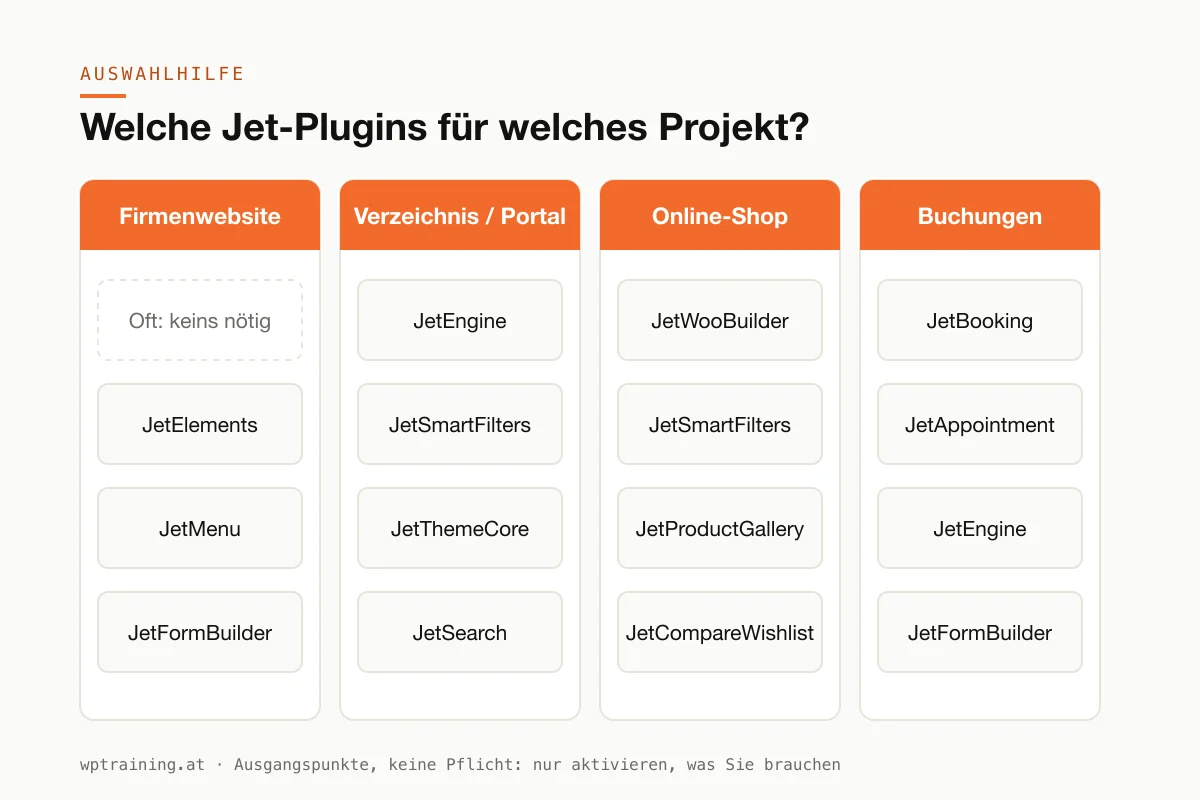
Which plugins for which project?
The following combinations are starting points, not obligations. Start small and only add more when there is a concrete need.
Company website
For a classic company website with five to fifteen pages, you often need no Jet plugin at all. Elementor on its own is enough in most cases.
Possibly useful:
- JetElements, if you're missing widgets, for example for pricing tables or timelines.
- JetMenu, if you have an extensive range of services and need a mega menu.
- JetFormBuilder for more extensive enquiry forms.
- JetThemeCore, if you want custom headers and footers without Elementor Pro.
Directory or property portal
This is where Crocoblock shows its real strength.
- JetEngine as the foundation: custom content types for properties, businesses or events, with their own fields.
- JetSmartFilters, so that visitors can filter by location, price or category.
- JetThemeCore for the single and archive page templates.
- Optionally JetSearch for fast search and JetMessenger if users should be able to contact each other directly.
Online shop
- JetWooBuilder for custom product and shop pages.
- JetSmartFilters for product filters.
- Depending on the range, JetProductGallery, JetCompareWishlist or JetProductTables.
A shop is the case where too many plugins pile up fastest. If you are not yet confident with WooCommerce itself, start there. That's what my WooCommerce training is for.
Bookings and appointments
- JetBooking for overnight stays, rentals and anything with periods spanning several days.
- JetAppointment for appointments of a fixed length, such as consultations, hairdressers or physiotherapy.
- JetEngine and JetFormBuilder as the foundation, depending on the scope.
Don't take both booking plugins if one is enough. The question "overnight stay or appointment?" usually settles it.
Single licence or All-Inclusive bundle?
Crocoblock sells each plugin individually or all of them together as a bundle. According to the pricing page:
| Offer | Price |
|---|---|
| Single plugins, 1 website | $43 to $75 per year |
| Single plugins, unlimited websites | $88 to $169 per year |
| All-Inclusive, 1 website | $199 per year |
| All-Inclusive Plus, 1 website | $249 per year (adds AI and automation features) |
| Lifetime, unlimited websites | $999 one-off |
JetGridBuilder and JetStyleManager are free. At the time of writing, additional discounts were shown on the single licences. (Prices as of October 2026 — please check before buying.)
The calculation is simple. JetEngine and JetSmartFilters each cost $75 per year as a single licence for one website. Add JetThemeCore and JetMenu and you quickly approach the price of the All-Inclusive bundle. From three or four paid plugins upwards, the bundle usually pays off. For a single plugin such as JetPopup or JetTabs, the single licence is the more honest choice.
If you build websites for clients, work out the numbers for the lifetime licence. Crocoblock allows separate subkeys for client projects that only apply to one domain. That way you don't have to hand over your main key.
You'll find the current bundles on the Crocoblock pricing page.
How I go about choosing
Before I buy a Jet plugin for a client project, I ask three questions.
What should the website do that Elementor alone can't? An example: a property developer wants to show apartments filterable by size, floor and price. Elementor can't do that, so it needs JetEngine and JetSmartFilters. A fancier menu, on the other hand, is a wish, not a need.
Is there already a tool on the website for this? If you have Elementor Pro, you already own a theme builder, popups and forms. I then only buy JetThemeCore, JetPopup and JetFormBuilder if a specific feature is missing.
Who will maintain the website afterwards? Every additional plugin is something your team has to understand. A directory with JetEngine is powerful, but it also needs explaining. If nobody in-house can maintain the entries, the finest structure won't help.
Only once these three questions are answered do I weigh single licences against the bundle.
To be honest: only activate what you need
The All-Inclusive bundle tempts you to install all 23 plugins. Every active plugin loads code, many of them on the front end too. Each one brings updates that need testing. And the more plugins interact, the harder troubleshooting becomes.
My rule: a Jet plugin only gets activated when it takes on a concrete task on the website. Whatever isn't used is deactivated and deleted. Crocoblock offers an installation wizard in the dashboard. Use it selectively, not for "everything".
I've described how to keep an Elementor website fast in Optimising Elementor performance. You'll find a general selection of useful extensions in WordPress plugins: my recommendations for 2026.
Frequently asked questions
Do I need Elementor Pro for Crocoblock?
No. According to Crocoblock, all JetPlugins work with Elementor without Elementor Pro being required. Some features, such as the theme builder, overlap with Pro. In that case you should choose one.
Is there a free trial?
No. Instead, Crocoblock offers a 30-day money-back guarantee. JetGridBuilder and JetStyleManager are free.
Does Crocoblock work without Elementor?
Partly. Some of the plugins work with the block editor, with Bricks or with Divi. Elementor, however, is the builder for which the entire range is available.
Which theme suits Crocoblock?
Crocoblock recommends its own theme, Kava, and also names Hello Elementor, Astra, OceanWP, Blocksy, GeneratePress, Kadence, Twenty Twenty-Five and Jupiter X. I usually use a lean theme such as Hello Elementor or GeneratePress.
Is the All-Inclusive bundle worth it for a single website?
Only if you genuinely need at least three or four paid Jet plugins. For a simple company website, almost never.
Help with choosing
Which Jet plugins your project really needs can usually be clarified in a short conversation before you spend any money. In my Elementor training we go through your plans together and set up the right plugins on your own website, remotely, at € 109 per hour.
Newsletter
WordPress know-how by email
New guides and practical tips on WordPress, Elementor and WooCommerce. No spam, unsubscribe any time.
Tags