Contents (12)
More and more people no longer just search on Google; they ask ChatGPT, Perplexity or Gemini. For website owners, this raises two new questions: how is my content found there? And do I even want every AI crawler to read everything?
JetGEO is the Crocoblock plugin for exactly these questions. "GEO" stands for generative engine optimisation, i.e. optimisation for AI-driven search systems. The plugin generates an llms.txt, regulates access by AI crawlers and logs their visits.
I work on this topic for my own website and for client projects. In this tutorial I show you what JetGEO can do, how to set it up and where I am cautious about the benefit.
The short answer
JetGEO makes sense if you want to deliberately control which content AI systems see, and if you want to know which AI crawlers visit your website. It works independently of the page builder; you need neither Elementor nor Bricks for it.
What it can't do: guarantee that ChatGPT recommends you. How much formats such as llms.txt are actually used by AI systems is currently an open question. Good, clearly structured content remains the foundation.
What JetGEO can do
According to the official product page:
| Feature | What's behind it |
|---|---|
| Automatic llms.txt | A structured summary of the public content is generated and kept up to date |
| AI assistant for llms.txt | An AI assistant can be connected via WordPress connectors to create and refine the template |
| Control crawler access | Allow or block specific AI crawlers via robots.txt without changing the rules for regular search engines |
| Markdown output | Provide selected content types such as pages, posts and products as lean Markdown instead of HTML for AI |
| Visibility rules | Define per content type what AI may see, exclude individual pages and posts |
| Crawler log | Every visit by a known AI crawler is recorded with request and response |
| Dynamic templates | Dynamic tags automatically pull the site name, content and article lists into llms.txt and Markdown templates |
| Setup wizard | Analyses the state of the website and brings the key settings together on one page |
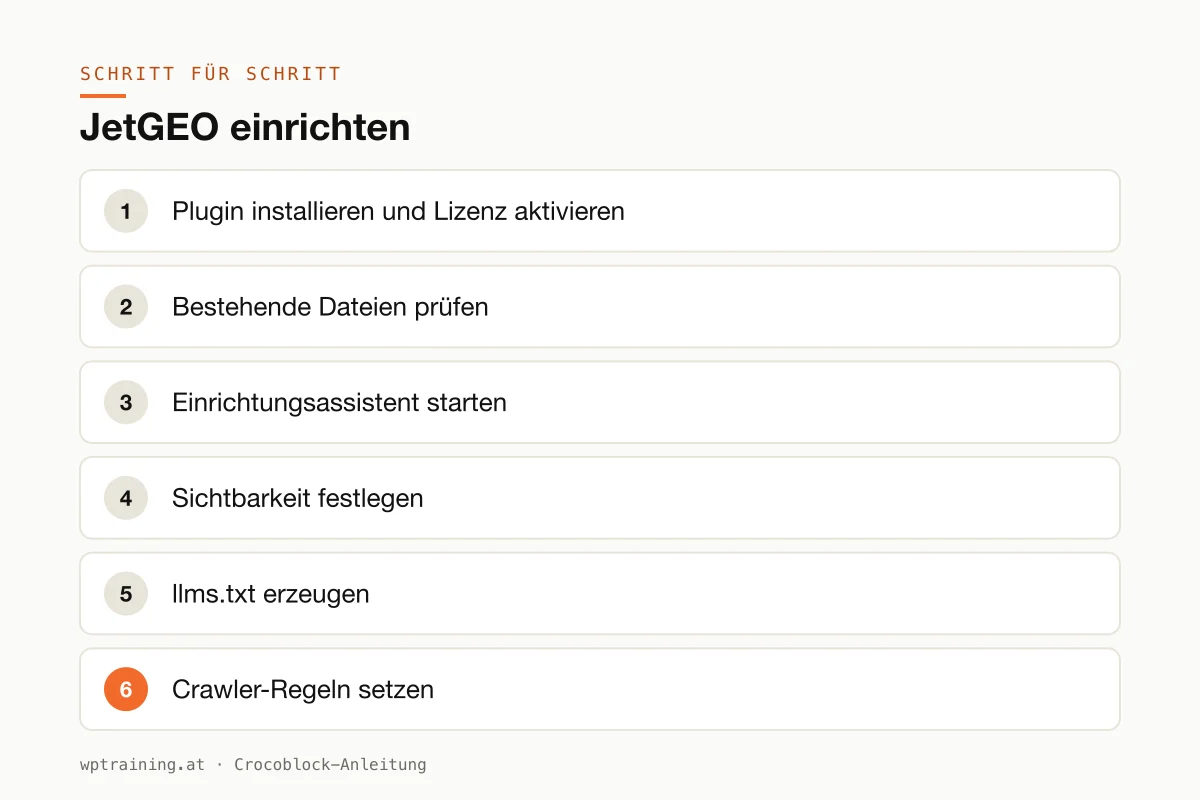
Step by step: setting up JetGEO
Practical example: a tax advisory firm in Vienna has a guide section with 60 articles and wants AI systems to find exactly this content, but not internal download pages.
- Install the plugin and activate the licence. Download JetGEO from your Crocoblock account, install it under Plugins → Add New → Upload Plugin and activate the licence in the Crocoblock dashboard in WordPress.
- Check existing files. Is there already an llms.txt or custom rules in the robots.txt, for example from your SEO plugin? Make a note of it. Two tools writing the same file lead to confusion.
- Start the setup wizard. The wizard analyses the current state and shows the most important settings on one page. Go through it once completely.
- Define visibility. Release posts and the most important pages for AI. Exclude what doesn't belong there: thank-you pages, internal downloads, outdated promotions.
- Generate the llms.txt. Let the file be created automatically and check the result in the browser at
your-domain.at/llms.txt. Are the title and description right? Are the right articles linked?
- Set crawler rules. Decide deliberately which AI crawlers get access. If you want to appear in AI answers, you shouldn't block the major providers across the board. The rules for Google and Bing are not affected.
- Enable Markdown output. For the released content types, provide the lean Markdown version.
- Evaluate after a few weeks. Look at the crawler log: which bots come, what do they request, do they get a sensible response? Adjust the rules based on this real data.
Three practical examples
A consultancy's specialist blog. Guide articles are released, offer pages and downloads remain excluded. After a month, the log shows which articles AI crawlers request most often.
Online shop for the trade. Product pages are provided as Markdown, while cart, account and checkout remain blocked. Crawlers from providers the shop wants nothing to do with are locked out.
Agency with several client sites. A uniform approach for all clients: the same rules, the same evaluation. According to Crocoblock, with many websites the All-Inclusive bundle then pays off instead of individual licences.
Typical mistakes and how to avoid them
- Blocking everything out of caution. If you block every AI crawler, you won't appear in AI answers. Make the decision deliberately, not by reflex.
- Two plugins for the same file. If the SEO plugin and JetGEO both manage an llms.txt or robots.txt, one of them wins, and you don't know which. Decide who is responsible.
- Caching and CDN. If robots.txt or llms.txt is served from the cache, crawlers see old rules. After changes, clear the cache and check the files directly in the browser.
- Expectations that are too high. An llms.txt doesn't replace good content. If your pages don't give clear answers, even the best plugin won't change that.
- Neglecting regular SEO. AI systems often rely on search results. Clean titles, meta descriptions and internal links remain the basis.
Is JetGEO worth it? Costs and alternatives
According to the product page, JetGEO costs 55 US dollars per year for one website; at times Crocoblock shows a reduced promotional price there. It is also included in the All-Inclusive (from 199 US dollars per year), All-Inclusive Plus (249 US dollars per year) and Lifetime (a one-off 999 US dollars) bundles. If you already have one of these bundles, you get JetGEO at no extra cost. (Prices as of October 2026 — please check before buying.)
To be honest: you can also maintain a simple llms.txt and a few lines in robots.txt by hand, and some SEO plugins now offer an llms.txt feature of their own. JetGEO is worth it above all if you want to use visibility rules per content type, the Markdown output and especially the crawler log. If you already have a Crocoblock bundle, there is little reason not to try it. View JetGEO at Crocoblock
Which other plugins might be worth considering is shown in my Crocoblock overview and my WordPress plugin recommendations for 2026.
Frequently asked questions
What is an llms.txt?
A text file in the root directory of your website that gives AI systems a structured overview of the most important content, similar to a sitemap for search engines. Whether and how much AI providers evaluate it is not yet consistently settled.
Does JetGEO affect my Google ranking?
According to Crocoblock, AI crawlers can be controlled without changing the rules for regular search engines. So the plugin shouldn't have any direct influence on your Google ranking.
Do I need Elementor for JetGEO?
No. According to Crocoblock, JetGEO works independently of the page builder and accesses the WordPress content directly.
Can I lock out specific AI crawlers?
Yes. JetGEO recognises known AI crawlers and creates targeted allow or block rules in robots.txt. Bear in mind: robots.txt is a request, not technical protection.
Help with the setup
If you want to prepare JetGEO, or your website as a whole, for AI search: in my WordPress training we go through it together on your own website, remotely, € 109 per hour. If you work with Elementor, the Elementor training is a good fit too.
Newsletter
WordPress know-how by email
New guides and practical tips on WordPress, Elementor and WooCommerce. No spam, unsubscribe any time.
Tags