Contents (12)
Every website has a contact form. Things get interesting after that: the registration for the summer course with a choice of week, the quote form with a price calculation, the sign-up for the members' area, the order form with payment. This is where simple form plugins quickly reach their limits.
JetFormBuilder is Crocoblock's form plugin. It covers the simple cases and goes as far as forms that create posts, register users or trigger a payment.
I use it mainly where forms need to work together with JetEngine data. In this tutorial I show you what it can do, how to build your first form and when another tool is enough.
The short answer
JetFormBuilder is worth it if your forms should do more than send an email: multi-step, with conditions, calculations, user registration or payments. Forms are built in the block editor and can be used and styled in Elementor and Bricks.
For a single contact form you don't need a paid licence. The basic version is enough there, or the Elementor Pro form widget if you already have it.
What JetFormBuilder can do
According to the official product page:
| Area | Features |
|---|---|
| Form types | Contact, multi-step, calculation, subscription, quiz, product order, application, registration |
| Payments | WooCommerce cart and checkout, PayPal including recurring payments, Stripe |
| Users | Login, verification, password reset, two render states |
| Front-end content | Update user profiles, create and edit posts of custom content types (CPT and CCT), repeater fields |
| Security & leads | CAPTCHA, GDPR consent, honeypot, sanitised input, saving progress, input masks, exporting entries |
| Logic | Conditional fields and conditional actions, calculations |
| Generate a PDF after submission and attach it to emails, custom PDF templates | |
| AI | Generate a form from a text description |
The page also lists additional features such as address and select autocomplete, hierarchical select and endpoints for formless actions. In September 2025, an add-on for recurring Stripe payments and a drag-and-drop file upload were added.
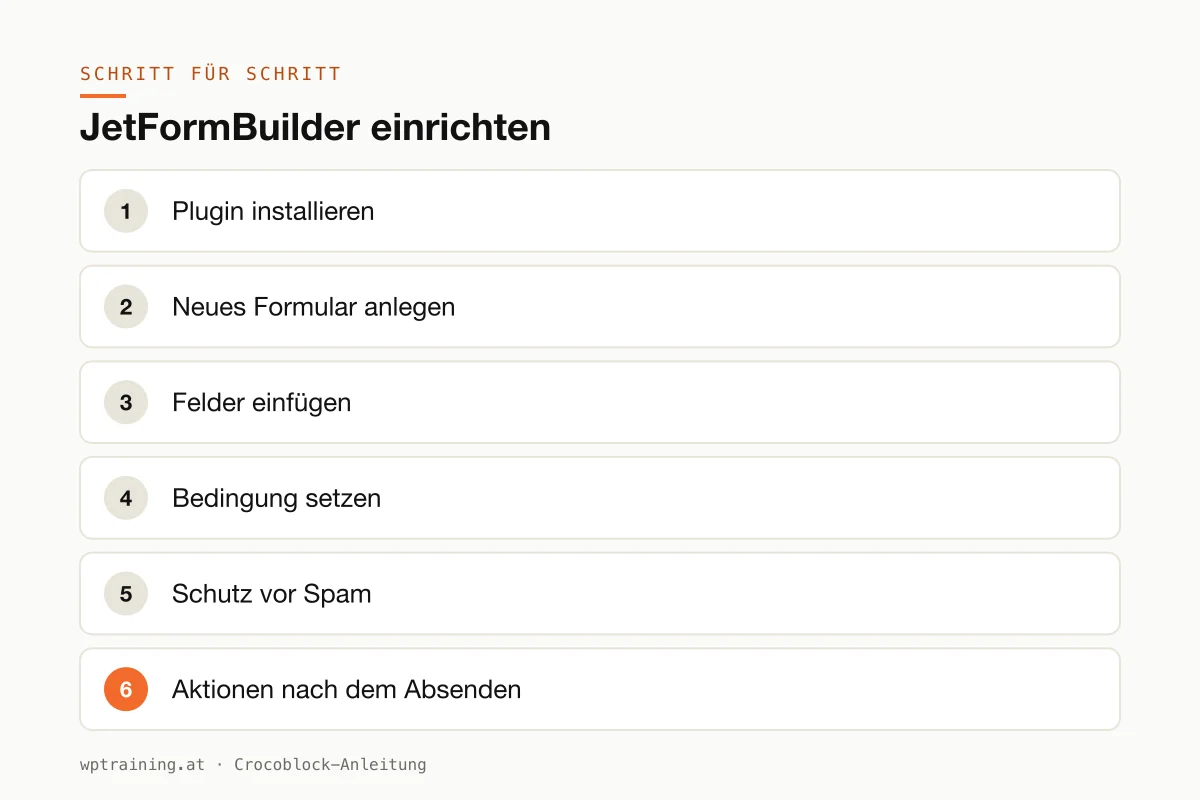
Step by step: setting up JetFormBuilder
Practical example: a joinery wants an enquiry form in which customers state whether it is about a kitchen, furniture or windows. Additional questions should only appear for "kitchen".
- Install the plugin. You'll find the basic version of JetFormBuilder in the WordPress plugin directory, i.e. directly under Plugins → Add New. The paid extensions come via your Crocoblock account, and you activate the licence in the Crocoblock dashboard in WordPress.
- Create a new form. In the JetFormBuilder menu, create a new form. The block editor opens, and every field is a block.
- Insert fields. Name, email, phone, then a select field "What is it about?" with the options kitchen, furniture, windows. Below that, a text field for the message.
- Set a condition. Insert a section with additional kitchen questions, such as room size and preferred time frame. Using conditional visibility, you specify that it only appears when "kitchen" is selected.
- Spam protection. Enable the honeypot and, if needed, a CAPTCHA. Add a checkbox for the privacy policy, with a link to your privacy page.
- Actions after submission. In the form settings you define what happens: an email to the joinery, optionally a confirmation to the customer. Store the entries as well, so that no enquiry is lost if an email ends up in spam.
- Embed the form. On the contact page, insert the JetFormBuilder widget in Elementor (the corresponding block in the block editor, the element in Bricks) and select your form. You adjust the design in the respective editor.
- Test. Fill in the form once with "kitchen" and once with "windows". Check whether the additional questions appear correctly and both emails arrive.
Three practical examples
Music school in Graz. Multi-step registration: first child and instrument, then parents and contact details, finally consents. Progress is saved in case someone stops halfway.
Event agency in Vienna. A quote form with a calculation: number of guests times flat rate plus selected extras. The customer sees the guide price immediately, the agency receives a PDF summary by email.
Trade association. Members register via a form and submit their directory entry themselves. The form directly creates a post in the JetEngine content type, which is reviewed before publication.
Typical mistakes and how to avoid them
- Emails don't arrive. Almost never a form problem, but a sending problem. Set up email sending via SMTP and store the entries as well.
- Two form plugins in parallel. If you mix JetFormBuilder, Contact Form 7 and Elementor forms, you lose track. Choose one.
- Caching on form pages. A page cache can let security tokens go stale, and then submission fails. When in doubt, exclude form pages from the cache.
- Forgetting data protection. Consent, a reference to the privacy policy and a clear deletion period for stored entries belong in every form in Austria and Germany.
- Forms that are too long. Every required field costs conversions. Only ask for what you need for the first reply.
Is JetFormBuilder worth it? Costs and alternatives
Pricing works differently for JetFormBuilder than for the other Crocoblock plugins. On the Crocoblock product page it is offered as part of the All-Inclusive bundle: 199 US dollars per year, All-Inclusive Plus 249 US dollars per year, Lifetime a one-off 999 US dollars, each with all 23 JetPlugins. You buy the Pro extensions individually via JetFormBuilder's own pricing page, starting at 49 US dollars per year for one website. (Prices as of October 2026 — please check before buying.)
My recommendation: start with the basic version. If you need payments, PDF generation or certain Pro features, buy them specifically. If you use JetEngine and other JetPlugins anyway, the bundle is the simpler solution. View JetFormBuilder at Crocoblock
Alternatives: the Elementor Pro form widget is enough for contact and newsletter forms. Contact Form 7 is free but spartan. JetFormBuilder comes into its own when forms should create content, users or bookings, for example together with JetEngine or JetBooking.
Frequently asked questions
Is JetFormBuilder free?
The basic version is available free of charge in the WordPress plugin directory. Payments via Stripe, PDF generation and other extensions are part of the paid Pro version or the Crocoblock bundles.
Can I use JetFormBuilder with Elementor?
Yes. The form is built in the block editor; according to Crocoblock, it is then used and styled in Elementor, Bricks or directly in the block editor.
Can a form accept payments?
Yes, via the WooCommerce checkout, PayPal (including recurring) or Stripe. For a real shop, though, WooCommerce remains the better tool.
Is JetFormBuilder GDPR-compliant?
The plugin comes with consent fields, a honeypot and CAPTCHA. Whether a form is legally compliant, however, depends on your configuration, your privacy policy and how you handle the data.
Help with the setup
If you'd rather not set up JetFormBuilder on your own: in my Elementor training we build your forms together on your own website, remotely, € 109 per hour. The Crocoblock overview gives you a summary of all the plugins.
Newsletter
WordPress know-how by email
New guides and practical tips on WordPress, Elementor and WooCommerce. No spam, unsubscribe any time.
Tags