Contents (11)
As soon as a website is more than a business card, the question comes up sooner or later: how do the users talk to each other? On a marketplace, the buyer wants to ask the seller something. In a directory, someone wants to contact the provider. On a learning platform, the participant has a question about the lesson.
Usually that ends up in email, in WhatsApp or in a contact form, and the context gets lost. Which listing was it about? Which appointment?
JetMessenger is Crocoblock's newest plugin and is designed for exactly this case: private messages between logged-in users, directly on the website and always tied to the content in question. In this post I show you what it can do, how to set it up and what it isn't meant for.
The short answer
JetMessenger is worth it for portals with several user roles: marketplaces, directories, booking platforms, learning and membership sites. Every conversation is attached to a listing, product or post. It is explicitly not a live chat for anonymous visitors and not a support widget. If you simply want to chat with visitors on your company website, you need a different tool.
What JetMessenger can do
According to the official product page:
| Area | What it means |
|---|---|
| Context-aware threads | Each conversation is tied to a listing, product page, page, post or service |
| Entry points | Chat button on listing, profile, product and service templates |
| Inbox | A dedicated "My Chats" area per user with all conversations, persistent across sessions |
| Content | Text messages with links, media attachments with preview |
| Delivery | Delivery status, notifications, activity overview |
| Permissions | Define which user roles may send and receive messages |
| Parallel threads | Several users write separately to the same provider; nothing gets merged |
| Data protection | Control storage, retention, export and deletion of conversations yourself, without a third-party service |
| Builders | Elementor, Gutenberg, Bricks; works with WooCommerce |
| Jet integration | Native integration with JetEngine, JetAppointment and JetBooking |
By its own account, Crocoblock deliberately left out feeds, groups and other social-network features. It is purely a tool for private conversations.
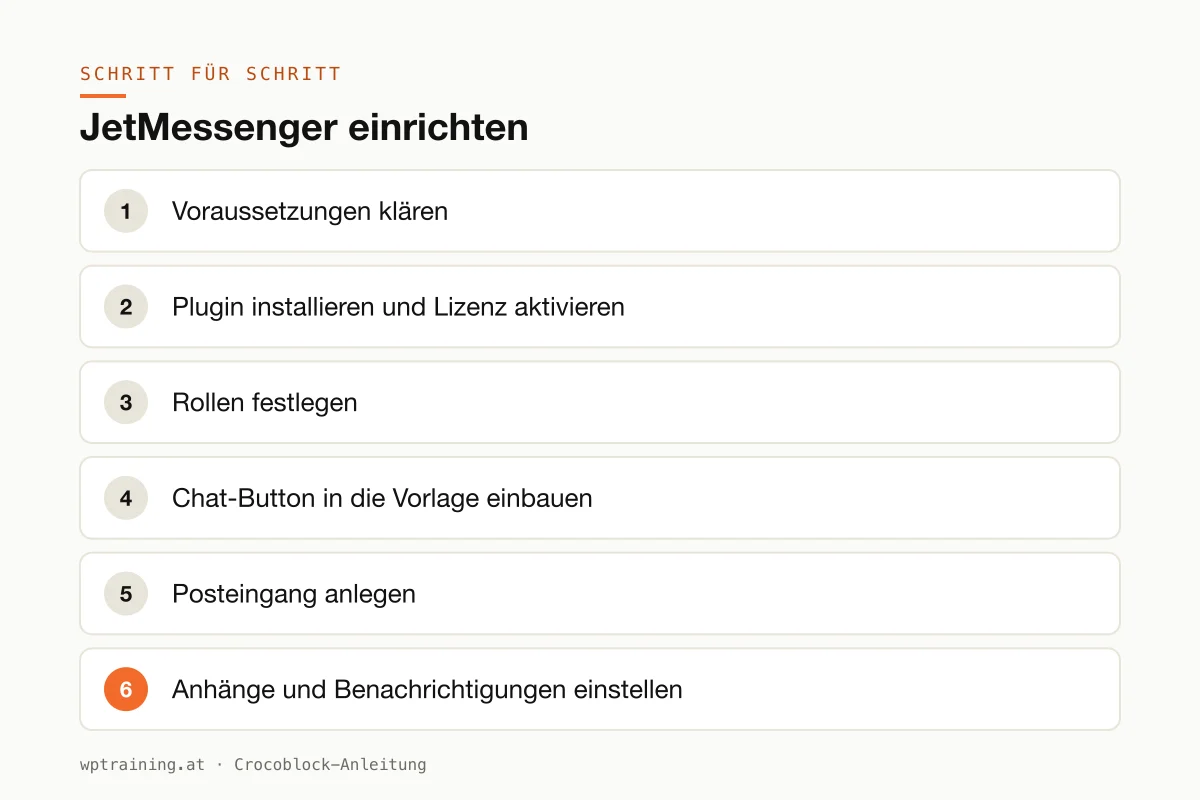
Step by step: setting up JetMessenger
As an example I'll take a regional directory of tradespeople: businesses have their own profile, and registered customers can send them a question about a specific listing.
- Clarify the prerequisites. JetMessenger works with logged-in users. So your website needs registration and user roles. The listings themselves are usually created with JetEngine as a custom post type.
- Install the plugin and activate the licence. Download JetMessenger from your Crocoblock account, install it under Plugins → Add New → Upload Plugin, activate it and enter the licence in the Crocoblock dashboard inside WordPress.
- Define the roles. In the JetMessenger settings you decide which roles may start conversations. In this example: registered customers may write to businesses, not the other way round and not to each other.
- Add the chat button to the template. Open the single template for the business profiles in Elementor, the block editor or Bricks and add the chat entry point. Because it sits in the template, it automatically appears on every profile.
- Create the inbox. Create a "My messages" page and place the inbox ("My Chats") on it. Link the page in the account area.
- Configure attachments and notifications. Decide whether images and files are allowed, and check how users are informed about new messages.
- Handle data protection. Define how long conversations are stored and update your privacy policy accordingly.
- Test with two accounts. Create a test customer and a test business. Write as the customer in one browser and reply as the business in a private window. Only when this works in both directions does the feature go live.
Three practical examples
The second-hand market for sports gear. A club runs a marketplace for used ski and bike equipment. Buyers ask about size or condition directly on the listing, and the seller sees immediately which item it's about.
The holiday apartment platform. Hosts in a tourist region let their apartments through a shared portal with JetBooking. Guests clarify questions about arrival or pets in the chat before booking, rather than by email.
The online academy. A trainer offers courses as a members' area. Participants ask questions directly on the relevant lesson, and the conversation stays where it belongs.
Common mistakes and how to avoid them
Mistaken for a visitor chat. If you are looking for a chat for anonymous visitors on your company website, this is the wrong tool. Crocoblock says so clearly in its own FAQ.
Roles too open. If everyone may write to everyone, you open the door to spam. Restrict the permissions to the direction your business model needs.
Data protection as an afterthought. Private messages are personal data. Define retention and deletion before the first real messages arrive, not afterwards.
Caching on account pages. The inbox and chat are personalised. Pages with this content must not be cached identically for all visitors. Exclude them from the page cache.
Too many plugins at once. A portal with JetEngine, filters, booking and messenger is powerful, but also demanding. Crocoblock recommends 512 MB of PHP memory. Good hosting is not a side issue here. More on this: Optimising Elementor performance.
Is JetMessenger worth it? Costs and alternatives
According to the pricing page, a single JetMessenger licence normally costs $55 per year for one website and $129 per year for unlimited websites, additionally discounted at the time of writing. The All-Inclusive bundle with all 23 Jet plugins starts at $199 per year for one website. (Prices as of October 2026 — please check before buying.)
My assessment:
- You're building a portal with JetEngine or JetBooking: then JetMessenger fits well, because it understands listings as a reason to talk. For multiple client projects, Crocoblock itself points out that the All-Inclusive bundle works out cheaper.
- You want to chat with visitors: then use a live chat or support tool. JetMessenger isn't meant for that.
- You have a community with groups and feeds in mind: there are dedicated community plugins for that. JetMessenger deliberately does without such features.
As JetMessenger is a new plugin, I would try it on a test copy before a large project. Crocoblock offers a 30-day money-back guarantee.
If it suits your project: View JetMessenger at Crocoblock. Which other Jet plugins belong in a portal is covered in my Crocoblock overview.
Frequently asked questions
Is JetMessenger a live chat for my website visitors?
No. Crocoblock describes it as a private messaging feature for logged-in users, such as buyers, sellers, members or course participants. It is not intended as a support widget for anonymous visitors.
Can I control who may write to whom?
Yes. You decide which user roles may send and receive messages.
Do I need coding skills?
According to Crocoblock, no. You set up chat entry points, the inbox and workflows via Elementor, Gutenberg, Bricks or the Crocoblock interface.
Does JetMessenger work with JetAppointment and JetBooking?
Yes, Crocoblock names JetEngine, JetAppointment and JetBooking as native integrations. For appointment booking, see JetAppointment.
If you'd rather not build a portal with messaging on your own: in my Elementor training we set up JetMessenger together on your own website, remotely, at € 109 per hour.
Newsletter
WordPress know-how by email
New guides and practical tips on WordPress, Elementor and WooCommerce. No spam, unsubscribe any time.
Tags