Contents (11)
Beyond a certain size, every normal dropdown menu reaches its limits. A shop with thirty categories, a service provider with twelve services, a municipality with citizen services, tourism and business: a long vertical list under one menu item helps nobody.
A mega menu solves this by opening a wide area on hover, divided into columns, with images, descriptions and highlights. JetMenu by Crocoblock is a plugin for exactly that. According to the product page, it works with Elementor and with the Gutenberg block editor.
I show you what JetMenu can do, how to turn a menu item into a mega menu and when a normal menu is perfectly sufficient.
The short answer
JetMenu is worth it if your website has many subpages or categories and you want to show them clearly, with images or products, in the menu. It is one of the Crocoblock plugins for which Elementor itself offers only limited equivalents. For a website with six menu items and no submenus, you don't need it.
What JetMenu can do
The official product page lists, among other things:
- Mega menu layouts with several levels, dynamic content, media and AJAX navigation. Product grids, banners and multimedia in the menu are possible.
- Menu types: dropdown menu, multi-level submenus and anchor menus for one-page layouts.
- Media in the menu: audio, videos and images, displayed as a grid, masonry or equal height.
- Custom menu templates that you build in the page builder with columns and sections.
- Mobile view in two ways: adaptive, meaning the same structure scaled down, or responsive with a separate layout for phones. Both can be combined.
- Layouts: horizontal, vertical (as a sidebar), full-screen menu and hamburger menu.
- Pop-up menu: the menu in a window that opens via a button or an icon.
- Performance: AJAX navigation and content caching.
- Styling: icons, badges, fonts, spacing and hover effects, style presets via a preset manager.
- Rolling up surplus items under a "More" button when space runs out.
- Further features: animation for submenus, multi-column mega menu, breakpoint setting, import and export of menus.
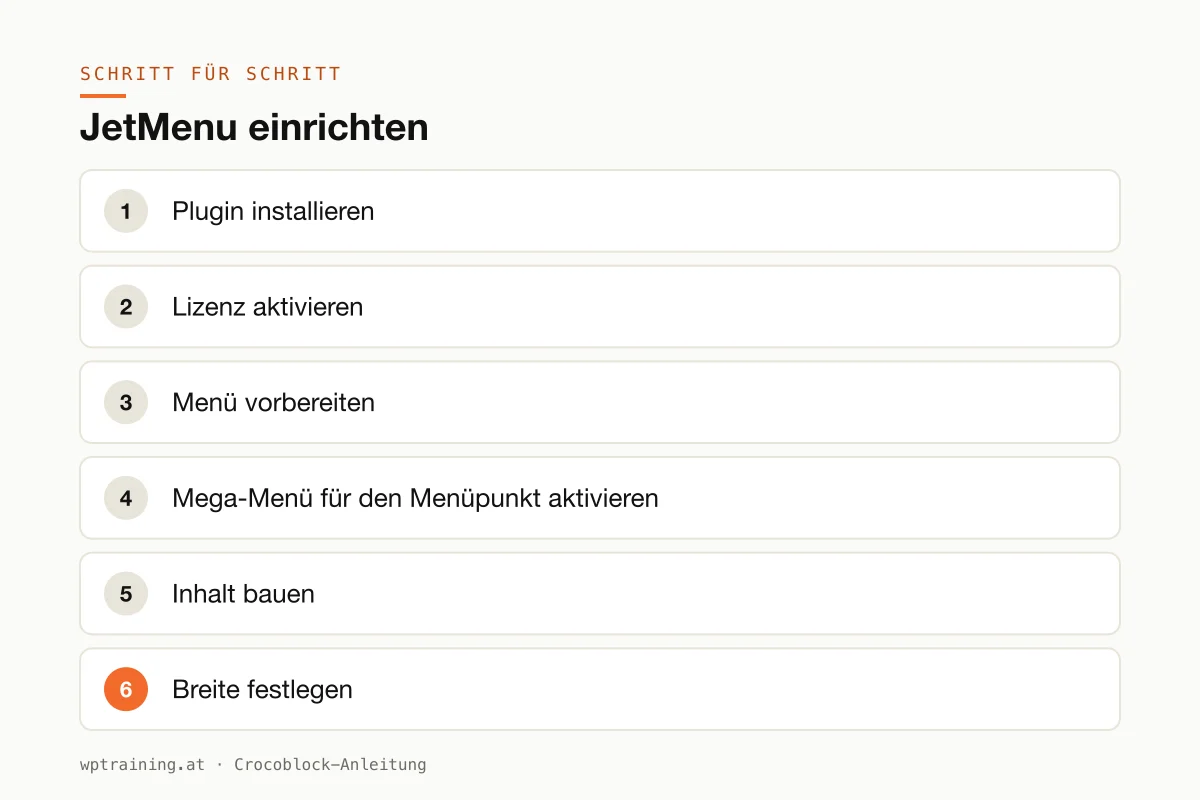
Step by step: setting up JetMenu
Practical example: a service provider's "Services" menu item is to get a mega menu with three columns, one service group each with a short description, plus an image with a contact button on the right.
- Install the plugin. Upload the ZIP file from your Crocoblock account under Plugins → Add New → Upload Plugin and activate it.
- Activate the licence. Enter the licence key in the WordPress menu under Crocoblock.
- Prepare the menu. Under Appearance → Menus, create or check the main menu. The "Services" item is already there.
- Activate the mega menu for the menu item. JetMenu adds its own settings to the menu management. There you activate the mega menu for "Services" and open its content for editing in the builder.
- Build the content. Create a section with four columns. In the first three, a heading, two sentences of description and links to the subpages each. In the fourth, an image and a "Book an appointment" button.
- Set the width. In the JetMenu settings, define how wide the mega menu opens, for example as wide as the page's content area.
- Output the menu in the header. In your header template, insert JetMenu's Mega Menu widget and select the main menu. In the Gutenberg editor there is a dedicated block for this.
- Define the mobile view. Decide whether phones get the same structure scaled down or a separate, slim layout. For mega menus with images, I recommend the separate layout.
- Style it. Colours and fonts from the global settings, a subtle opening animation, badges only where they mean something, such as "New".
- Test and publish. Check on desktop, tablet and phone that the menu opens and closes and that all links are reachable, including with the keyboard.
The result: a menu item that shows all services at a glance instead of sending visitors through three levels of dropdowns.
Three practical examples
A sports retailer in Innsbruck. The "Shop" menu item opens a mega menu with category cards for skiing, hiking and biking, plus a banner with the current promotion. For building the shop itself, the WooCommerce training is a good fit.
A tourism board in the Salzkammergut. Under "Experience", summer and winter sit side by side, each with images and the most important subpages. On phones there is a separate, slim hamburger menu.
A law firm in Frankfurt. A vertical menu in the sidebar for the areas of law that expands when needed. Surplus items are rolled up under "More".
Common mistakes and how to avoid them
Putting everything in the mega menu. A mega menu is not a sitemap. Show the most important subpages, not all of them.
Forgetting the mobile version. A mega menu with images and four columns doesn't work on a phone. Plan the mobile layout from the start.
Heavy content in the menu. Videos and large images in the menu are loaded on every page. Use the AJAX feature and keep the media small. More levers in optimising Elementor performance.
Two menu solutions. If the theme, Elementor Pro and JetMenu all output a menu at the same time, chaos is guaranteed. Decide on one solution.
Not checking accessibility. Menus that only open on hover are a problem for keyboard users. Test navigation with the Tab key.
Is JetMenu worth it? Costs and alternatives
According to Crocoblock, JetMenu costs $55 per year for one website as a single licence, with one year of updates and support. At times the page shows a promotional price. The All-Inclusive Plus bundle with all 23 JetPlugins costs $249 per year. A 30-day money-back guarantee applies. (Prices as of October 2026 — please check before buying.)
My assessment: JetMenu is one of the Crocoblock plugins I also recommend on its own when the need is there. Newer versions of Elementor Pro include their own mega menu, and there are free mega menu plugins in the WordPress directory. Both are worth a look. JetMenu scores with the separate mobile view, the many layouts and Gutenberg support.
If you also need header building blocks such as logo, search and cart, JetBlocks complements the menu. You will find an overview of all plugins in the Crocoblock overview.
If your menu is reaching its limits: view JetMenu at Crocoblock.
Frequently asked questions
What is a mega menu?
A mega menu opens a wide area with several columns under a menu item instead of a narrow list. It can contain links, text, images or products.
Does JetMenu work without Elementor?
Yes. According to Crocoblock, JetMenu works with the Elementor editor and the Gutenberg block editor. For Gutenberg there are dedicated blocks for the mega menu and hamburger menu.
Can I show a different menu on phones than on desktop?
Yes. JetMenu offers an adaptive menu with the same structure and a responsive one with a separate mobile layout. Both can be combined.
Does a mega menu slow down the page?
It can if it contains many images or videos. JetMenu offers AJAX navigation and caching. Keep the content lean all the same.
If you'd rather not set up JetMenu on your own: in my Elementor training we set it up together on your own website, remotely, € 109 per hour.
Newsletter
WordPress know-how by email
New guides and practical tips on WordPress, Elementor and WooCommerce. No spam, unsubscribe any time.
Tags