Contents (11)
Sooner or later almost everyone hits the same point: the home page needs a slider with customer testimonials, the services page a pricing table, the about page a timeline. Elementor can do a lot of that, but not everything, and some of it only in the Pro version.
JetElements by Crocoblock fills exactly that gap. It is a widget pack for Elementor that extends the toolbar with design and marketing building blocks. According to Crocoblock, there are 42 widgets.
I use JetElements in client projects, but not in every one. In this post I show you what the plugin can do, how to set it up and when you can save yourself the money.
The short answer
JetElements is worth it if you regularly build sliders, timelines, charts, pricing tables or team pages in Elementor and don't want to install a separate plugin for each task. For a simple five-page business card website you don't need it; Elementor alone is enough. It works exclusively with the Elementor editor.
What JetElements can do
On the official product page, Crocoblock lists these building blocks, among others:
| Area | Widgets and features |
|---|---|
| Presentation | Slider and carousel, portfolio gallery (grid, masonry, list, justify), before-and-after slider, post grid for blog posts and WooCommerce products, service blocks |
| Media | Audio and video player for YouTube, Vimeo and self-hosted files, Lottie animations, inline SVG |
| Marketing | Reviews and testimonials, timelines (vertical and horizontal), countdown timer, team profiles, logo showcase, banner, download button |
| Data | Pie chart, bar chart, progress bar, circle progress, responsive tables |
| Other | Interactive map, Instagram feed, weather widget, animations for buttons, icons and text, vertical scrolling effect |
On top of that come 47 design templates that Crocoblock offers based on JetElements. The portfolio gallery supports multiple tags per image, a "View more" button and a full-size view. Recent updates added YouTube Shorts to the video player and a privacy option for Vimeo videos. The latter is quite relevant for GDPR-conscious websites in the DACH region.
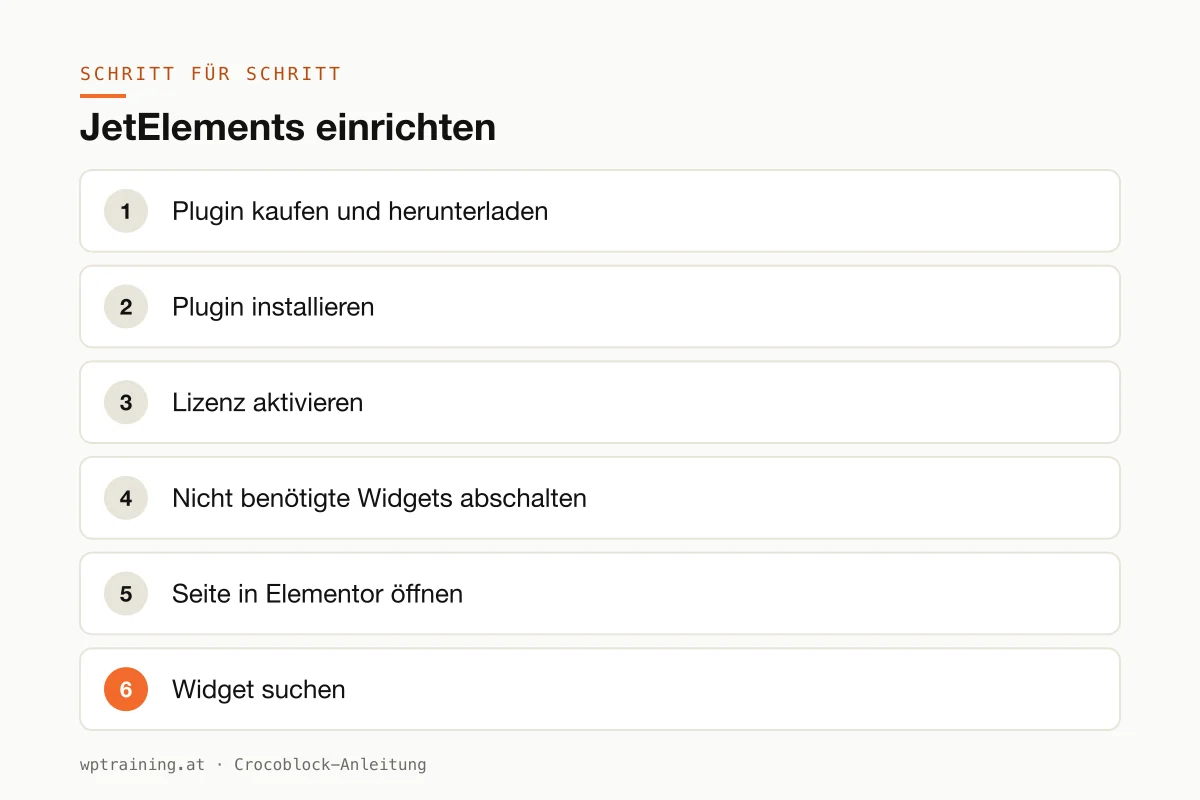
Step by step: setting up JetElements
As a practical example, I build a slider with three customer testimonials for the home page.
- Buy and download the plugin. After purchase you will find the ZIP file in your Crocoblock customer account.
- Install the plugin. In WordPress go to Plugins → Add New → Upload Plugin, select the ZIP file, install and activate it. Elementor must already be active.
- Activate the licence. A Crocoblock section appears in the WordPress menu. Enter your licence key there so you receive updates.
- Switch off widgets you don't need. In the JetPlugins settings within the Crocoblock section you can deactivate individual widgets. I switch off everything the project doesn't need. That keeps the editor tidy.
- Open the page in Elementor. Edit the home page and add a new section where you want the slider.
- Find the widget. Search for "Testimonials" in the widget panel on the left. You can recognise the JetElements widgets by the Jet icon.
- Add the content. Create three entries: name, role or company, quote and optionally a photo. Short quotes work better than long ones.
- Configure the display. Set the number of visible entries per screen width, choose the navigation (arrows or dots) and only switch on autoplay if the interval is generous.
- Style it. In the Style tab, set fonts and colours via the global settings, not by hand.
- Check on mobile. Use the responsive view to check that one entry per row is shown on a phone. Then publish.
The result: a testimonial slider that matches the rest of the page and works on every device. You build a pricing table or a timeline following the same pattern.
Three practical examples
A joinery in the Pinzgau region. A craft business wants to show its work. With the before-and-after slider, a renovated staircase becomes a convincing argument, and the portfolio gallery in masonry layout sorts the projects by category.
A sports club in Upper Austria. The club's history as a horizontal timeline, the coaching team via the team profile widget, the countdown to the next tournament. All without an extra plugin for every single feature.
A consultancy in Munich. Three packages in a responsive pricing table, customer testimonials below as a slider and the office locations on an interactive map. A typical home page for service providers.
Common mistakes and how to avoid them
Leaving all widgets active. Every active widget costs a little in the editor. Switch off what you don't use. More on this in optimising Elementor performance.
Too many effects. Animations, parallax, autoplay sliders and a countdown on one page quickly look restless and cost loading time. One moving element per screen is enough.
Duplicate plugins. If you use JetElements and have also installed a second widget pack with sliders and pricing tables, a lot gets loaded twice. Pick one.
External content without consent. The Instagram feed, the map and YouTube videos load content from third-party servers. Use your cookie banner to control when they may load.
Forgetting the cache. After larger layout changes, clear the page cache, otherwise visitors will still see the old version.
Is JetElements worth it? Costs and alternatives
Crocoblock sells JetElements as a single licence at a list price of $75 per year for one website. This includes one year of updates and one year of support. At times the page shows a reduced promotional price. Alternatively there is the All-Inclusive Plus bundle for $249 per year with all 23 JetPlugins. A 30-day money-back guarantee applies. (Prices as of October 2026 — please check before buying.)
My calculation: if you only need JetElements, the single licence is the sensible choice. As soon as you also want to use JetEngine for dynamic content or JetMenu for a mega menu, the bundle quickly becomes cheaper. You will find an overview of all plugins in my Crocoblock overview.
Alternatives: Elementor Pro itself includes a testimonial carousel, pricing tables, a countdown and a posts grid. If you already have Pro and only need those building blocks, JetElements is superfluous. There are also free widget packs in the WordPress directory that cover part of it. What sets JetElements apart is mainly having charts, timelines and the before-and-after slider in one package.
If that fits your project: view JetElements at Crocoblock.
Frequently asked questions
Does JetElements work without Elementor?
No. According to Crocoblock, JetElements is built for the Elementor editor. Without Elementor the plugin does nothing.
Do I need Elementor Pro for JetElements?
Not necessarily. JetElements adds its own widgets to Elementor. Whether you also need Pro depends on whether you want to use Elementor's Theme Builder, forms or popups.
How many widgets does JetElements include?
Crocoblock speaks of 42 widgets, from sliders and charts to the map and weather widget.
Will JetElements slow down my website?
Not automatically. What matters is how many widgets are active and how many effects you combine on one page. Deactivate unused widgets and use animations sparingly.
If you'd rather not set up JetElements on your own: in my Elementor training we set it up together on your own website, remotely, € 109 per hour.
Newsletter
WordPress know-how by email
New guides and practical tips on WordPress, Elementor and WooCommerce. No spam, unsubscribe any time.
Tags